入口文件

  • entry: './index.js'

  • entry: ['./index.js', './other.js']

  • entry: {main: './index.js', other: './other.js'}

第三种对象模式需要指定多出口

1
2
3
4
5
output: {
// path: 绝对路径的字符串
path: path.resolve(__dirname, './dist'),
filename: '[name].[chunkhash:8].js'
}

三种hash

  • hash是打包后的该版本的hash,

  • chunkhash是对应每个chunk的hash

  • contenthash是针对内容改变(适用被引用的css文件)

用chunkhash而不是hash来生成打包文件的目的是:使用浏览器缓存。比如

index.js引用了a.js和b.js和styles.css,如果只改了index.js而不改变其他的文件,其他3个文件原本可以用浏览器的缓存防止重新加载新的一样的文件,如果用hash每次打包重新生成一个新的就要重新下载新的这3个文件。

Webpack-dev-server

package.json中的scripts属性里填写 npx webpack-dev-server

webpack.config.js中的devServer属性是个对象,属性有port、hot、open、contentBase、progress,proxy等

  • Package.json中运行了npx webpack-dev-server后就可以在内存中存放输出的index.html和js等不会在dist中生成
  • 热更新hot:本地保存后自动刷新页面,不需要手动刷新。
  • 热模块更新hmr,适用于css:改变样式后页面局部(模块)刷新,可以保留其他状态
  • 代理proxy: 对象,防止跨域。键是代理的请求相对路径比如’/api/info’,值也是对象,其键target的值是代理的地址,比如’http://localhost:9092'

按需加载

代码中使用import(‘XXX’)的方式会按需加载,打包的时候会多出一个0.js

module

包含rules对象

babel:babel-loader只与webpack桥接,放到use属性的loader属性里、@babel/babel-core核心库,装了它才可以使用preset-env、@babel/preset-env各种新es特性转换为es5,放到use属性的options属性的presets属性里。

通过上⾯的⼏步 还不够,默认的Babel只⽀持let等⼀些基础的特性转换,Promise等⼀些还有转换过来,这时候需要借助@babel/polyfill,把es的新特性都装进来,来弥补低版本浏览器中缺失的特性

useBuiltIns 选项是 babel 7 的新功能,这个选项告诉 babel 如何配置 @babel/polyfill 。 它有三个参数可以使⽤: ①entry: 需要在 webpack 的⼊⼝⽂件⾥ import “@babel/polyfill” ⼀次。 babel会根据你的使⽤情况导⼊垫⽚,没有使⽤的功能不会被导⼊相应的垫⽚。因为是导入会造成污染全局 ②usage(试验阶段): 不需要 import ,全⾃动检测,但是要安装@babel/polyfill 。类似@babel/plugin-transform-runtime ,不会造成全局污染。

plugins

常用插件:HtmlWebpackPlugin、CleanWebpackPlugin、webpack.HotModuleReplacementPlugin

optimization

optimize-css-assets-webpack-plugin、terser-webpack-plugin

首先打开主题下(比如next)的配置文件_config.yml,然后搜索menu找到如下配置项,将about、tags、categories前的#号去掉,就开启了关于、标签和分类标签,当然还有其他菜单项也可以开启

1
2
3
4
5
6
7
8
9
menu:
home: / || home
about: /about/ || user
tags: /tags/ || tags
categories: /categories/ || th
archives: /archives/ || archive
#schedule: /schedule/ || calendar
#sitemap: /sitemap.xml || sitemap
#commonweal: /404/ || heartbeat

重新生成部署后,可以看到新增的菜单项,但是单击后会报如下错误

1
2
3
Cannot GET /about/
Cannot GET /tags/
Cannot GET /categories/

这是因为你还需运行如下命令新建相关页面

1
2
3
hexo new page "about"
hexo new page "tags"
hexo new page "categories"

运行结果如下,会再source文件下创建about、tags、categories文件夹,每个文件夹下还会创建一个index.md文件表示关于、标签页分类页面,编辑这三个MarkDown文件可以自定义这三个页面的内容

1
2
3
4
5
6
7
D:\hexo\blog>hexo new page "about"

INFO Created: D:\hexo\blog\source\about\index.md
D:\hexo\blog>hexo new page "tags"
INFO Created: D:\hexo\blog\source\tags\index.md
D:\hexo\blog>hexo new page "categories"
INFO Created: D:\hexo\blog\source\categories\index.md

还差最后一步,打开各页面对应的index.md文件,编辑如下内容,title和date是默认生成的,增加type即可

1
2
3
4
5
6
7
8
9
10
11
---
title: about
date: 2019-06-25 19:16:17
type: "about"
---

---
title: about
date: 2019-06-25 19:16:17
type: "tags"
---

重新生成和部署即可看到效果

Version

软件版本号有四部分组成:

  • 第一部分为主版本号,变化了表示有了一个不兼容上个版本的大更改
  • 第二部分为次版本号,变化了表示增加了新功能,并且可以向后兼容
  • 第三部分为修订版本号,变化了表示有bug修复,并且可以向后兼容
  • 第四部分为日期版本号加希腊字母版本号,希腊字母版本号共有五种,分别为base、alpha、beta 、RC 、 release
    在这里插入图片描述
1
2
3
4
5
6
7
8
{
"dependencies": {
"foo": "2.1.0", // 指定版本
"bar": "~1.2.3", // 锁定主要版本和次要版本,只能改变最后一位且大于等于当前值
"elf": "^2.1.2" // 主要版本非0状态下锁定大版本,次要版本和小版本可以变动为大于等于当前值,主要版本为0状态下,锁定主要版本和次要版本,同~
"thr": "latest" // 最新版本
}
}

License

img

依赖包

dependencies : 业务依赖

devDependencies :开发依赖

peerDependencies : 同等/同伴依赖

要求安装者安装本插件包时,指定其他依赖的版本号,但只是警告⚠️,并非强制给你安装,需要自行安装指定版本,用来解决插件与依赖的包不一致。

比如安装element-ui插件包时,它会指定vue的版本号,如果你安装的vue版本号不在它指定的范围内它会警告你并提示你手动安装它指定的版本。

bundledDependencies : 打包依赖

npm pack 用来生成一个包含非node_modules的gtz压缩文件,如果要加上node_modules,可以在bundledDependencies属性里把dependencies和devDependencies已有的依赖放入数组中:

1
2
3
4
5
6
7
8
9
10
11
12
13
14
15
16

"name": "font-end",
"version": "1.0.0",
"dependencies": {
"fe1": "^0.3.2",
...
},
"devDependencies": {
...
"fe2": "^1.0.0"
},
"bundledDependencies": [
"fe1",
"fe2"
]
}

package-lock.json

  • 在⼤版本相同的前提下,如果⼀个模块在 package.json 中的⼩版本要⼤于 package-lock.json 中的⼩版本,则在执⾏ npminstall 时,会将该模块更新到⼤版本下的最新的版本,并将版本号更新⾄ package-lock.json 。如果⼩于,则被package-lock.json 中的版本锁定。

  • 如果⼀个模块在 package.json 和 package-lock.json 中的⼤版本不相同,则在执⾏ npm install 时,都将根据 package.json 中⼤版本下的最新版本进⾏更新,并将版本号更新⾄ package-lock.json 。

  • 如果⼀个模块在 package.json 中有记录,⽽在 package-lock.json 中⽆记录,执⾏ npm install 后,则会在 package-lock.json ⽣成该模块的详细记录。同理,⼀个模块在 package.json 中⽆记录,⽽在 package-lock.json 中有记录,执⾏ npm install 后,则会在 package-lock.json 删除该模块的详细记录。

bin

它是一个命令名和本地文件名的映射。在安装时,如果是全局安装,npm将会使用符号链接把这些文件链接到prefix/bin,如果是本地安装,会链接到./node_modules/.bin/。

通俗点理解就是我们全局安装, 我们就可以在命令行中执行这个文件, 本地安装我们可以在当前工程目录的命令行中执行该文件。

1
2
3
"bin": {
"mason": "./index.js"
},

要注意: 这个index.js文件的头部必须有这个#!/usr/bin/env node节点, 否则脚本将在没有节点可执行文件的情况下启动。

Index.js文件:

1
2
3
#!/usr/bin/env node

console.log('cool')

全局npm i后接下来你在任意目录新开一个命令行, 输入mason, 你将看到cool字段。

vue-cli和create-react-app都是这个道理。

script

npm 脚本的原理非常简单。每当执行npm run,就会自动新建一个 Shell,在这个 Shell 里面执行指定的脚本命令。因此,只要是 Shell(一般是 Bash)可以运行的命令,就可以写在 npm 脚本里面。

比较特别的是,npm run新建的这个 Shell,会将当前目录的node_modules/.bin子目录加入PATH变量,执行结束后,再将PATH变量恢复原样。

这意味着,当前目录的node_modules/.bin子目录里面的所有脚本,都可以直接用脚本名调用,而不必加上路径。比如,当前项目的依赖里面有 Mocha,只要直接写mocha test就可以了。

  • 通配符:*表示任意文件名,**表示任意一层子目录。

    1
    2
    "lint": "jshint *.js"
    "lint": "jshint **/*.js"

如果要将通配符传入原始命令,防止被 Shell 转义,要将星号转义。

1
"test": "tap test/\*.js"
  • 脚本传参符号: –

    1
    "server": "webpack-dev-server --mode=development --open --iframe=true "
  • 脚本执行顺序

    并行执行(即同时的平行执行),可以使用&符号

    1
    npm run script1.js & npm run script2.js

    继发执行(即只有前一个任务成功,才执行下一个任务),可以使用&&符号

    1
    $ npm run script1.js && npm run script2.js
  • 脚本钩子

    npm 脚本有pre和post两个钩子。举例来说,build脚本命令的钩子就是prebuild和postbuild。

    1
    2
    3
      "prebuild": "echo I run before the build script",
    "build": "cross-env NODE_ENV=production webpack",
    "postbuild": "echo I run after the build script"

    用户执行npm run build的时候,会自动按照下面的顺序执行。

    1
    npm run prebuild && npm run build && npm run postbuild

因此,可以在这两个钩子里面,完成一些准备工作和清理工作。下面是一个例子。

1
2
3
"clean": "rimraf ./dist && mkdir dist",
"prebuild": "npm run clean",
"build": "cross-env NODE_ENV=production webpack"

npm 默认提供下面这些钩子。

  • prepublish,postpublish
  • preinstall,postinstall
  • preuninstall,postuninstall
  • preversion,postversion
  • pretest,posttest
  • prestop,poststop
  • prestart,poststart
  • prerestart,postrestart

    自定义的脚本命令也可以加上pre和post钩子。比如,myscript这个脚本命令,也有premyscript和postmyscript钩子。不过,双重的pre和post无效,比如prepretest和postposttest是无效的。

    npm 提供一个npm_lifecycle_event变量,返回当前正在运行的脚本名称,比如pretest、test、posttest等等。所以,可以利用这个变量,在同一个脚本文件里面,为不同的npm scripts命令编写代码。请看下面的例子。

    1
    2
    3
    4
    5
    6
    7
    8
    9
    10
    11
    12
    13
    const TARGET = process.env.npm_lifecycle_event;

    if (TARGET === 'test') {
    console.log(`Running the test task!`);
    }

    if (TARGET === 'pretest') {
    console.log(`Running the pretest task!`);
    }

    if (TARGET === 'posttest') {
    console.log(`Running the posttest task!`);
    }

windows下拿到package.json的变量

需要安装cross-env

1
npm install cross-env --save-dev

Package.json:

1
2
3
4
"page": "test",
"scripts": {
"dev": "cross-env PAGE=$npm_package_page cross-env NODE_ENV=dev
},

在执行 npm run dev的时候通过 process.env.NODE_ENV 即可获取环境变量 dev,通过process.env.PAGE即可获取变量test

缘由

又来装逼了,看到同事的mac上可以简单敲gco就能切换分支,而自己在git bash里只能用敲git checkout, 麻烦!

方法

其实git bash支持自定义alias,如下两种方法 :

1、在C盘用户名下的.gitconfig里可以输入[alias] co = checkout
2、用命令 git config --global alias.co checkout

但这两种方法实际用的时候只能这样省略:git co, 前面还有git没有简写。

bash 方法

后来想到git bash也是bash,于是用命令alias gs="git status" 终于可以实现,莫急,窗口关闭后再打开又没了,需要重新设置。麻烦!

改进

于是google了一下搜到可以在c盘自己用户名下建一个.bashrc文件专门用于存放自己的alias,类似:

1
2
3
alias gs="git status"    
alias gco="git checkout"
alias gada="git add --all"

然后还需在旁边加一个 .bash_profile 文件,文件中写入内容 source ~/.bashrc
重开窗口输入gco master 成功切换到master分支!

说明

一个简单的用canvas画的可自定义颜色和起止位置的动画百分比

–>先看效果<–

配置

参数 默认值 说明
baseColor #e1e1e1 底部圆颜色
coverColor #45050 动画圆颜色
lineWidth 6 圆宽
percentage 0.8 百分比
roundStartDegree 0 底部圆结束度数
roundEndDegree 360 底部圆结束度数
coverStartDegree 0 动画圆开始度数
radius 80 半径
speed 10 动画速度
shape round 动画圆边角形状
subtitle 辅助文字
numberFont 60px Microsoft YaHei 数字字体
subFont 18px PT Sans 辅助字体

计算度数和弧度

知道起止度数,计算实际静止圆的度数:

1
2
difference = this.options.roundStartDegree - this.options.roundEndDegree,
actureDegree = difference > 0 ? 360 - difference : Math.abs(difference),

知道实际静止圆的度数和百分比算出动画圆的结束弧度

1
endArc = this.options.percentage * actureDegree * Math.PI / 180;

依赖

jQuery

调用

例如:

1
2
3
$('.aaa').percentageAnimation({  
speed: 20
});

Git地址

percentageAnimation项目地址

下载tree

下载地址
请下载 Binaries 版本。

添加tree

将下载文件的 bin/ 目录下的 tree.exe 复制到 c:/program files/git/usr/bin 目录中。

原文地址

例子

1
tree -I node_modules -L 2 //忽略node_modules后只显示2级目录

###HTTP消息?

HTTP消息由客户端到服务器的请求和服务器到客户端的响应组成。请求消息和响应消息都是由开始行(对于请求消息,开始行就是请求行,对于响应消息,开始行就是状态行),消息报头(可选),空行(只有CRLF的行),消息正文(可选)组成。常用于分析ajax请求等。

HTTP消息报头分类

HTTP消息报头包括普通报头请求报头响应报头实体报头
每一个报头域都是由名字+“:”+空格+值 组成,消息报头域的名字是大小写无关的。

head

#####1、普通报头

在普通报头中,有少数报头域用于所有的请求和响应消息,但并不用于被传输的实体,只用于传输的消息。

eg:
Cache-Control 用于指定缓存指令,缓存指令是单向的(响应中出现的缓存指令在请求中未必会出现),且是独立的(一个消息的缓存指令不会影响另一个消息处理的缓存机制),HTTP1.0使用的类似的报头域为Pragma。
请求时的缓存指令包括:no-cache(用于指示请求或响应消息不能缓存)、no-store、max-age、max-stale、min-fresh、only-if-cached;
响应时的缓存指令包括:public、private、no-cache、no-store、no-transform、must-revalidate、proxy-revalidate、max-age、s-maxage.

eg:为了指示IE浏览器(客户端)不要缓存页面,服务器端的JSP程序可以编写如下:response.sehHeader(“Cache-Control”,”no-cache”);
//response.setHeader(“Pragma”,”no-cache”);作用相当于上述代码,通常两者//合用
这句代码将在发送的响应消息中设置普通报头域:Cache-Control:no-cache

Date普通报头域表示消息产生的日期和时间

Connection普通报头域允许发送指定连接的选项。例如指定连接是连续,或者指定“close”选项,通知服务器,在响应完成后,关闭连接

#####2、请求报头

请求报头允许客户端向服务器端传递请求的附加信息以及客户端自身的信息。
常用的请求报头

Accept

Accept请求报头域用于指定客户端接受哪些类型的信息。eg:Accept:image/gif,表明客户端希望接受GIF图象格式的资源;Accept:text/html,表明客户端希望接受html文本。

Accept-Charset

Accept-Charset请求报头域用于指定客户端接受的字符集。eg:Accept-Charset:iso-8859-1,gb2312.如果在请求消息中没有设置这个域,缺省是任何字符集都可以接受。

Accept-Encoding

Accept-Encoding请求报头域类似于Accept,但是它是用于指定可接受的内容编码。eg:Accept-Encoding:gzip.deflate.如果请求消息中没有设置这个域服务器假定客户端对各种内容编码都可以接受。

Accept-Language

Accept-Language请求报头域类似于Accept,但是它是用于指定一种自然语言。eg:Accept-Language:zh-cn.如果请求消息中没有设置这个报头域,服务器假定客户端对各种语言都可以接受。

Authorization

Authorization请求报头域主要用于证明客户端有权查看某个资源。当浏览器访问一个页面时,如果收到服务器的响应代码为401(未授权),可以发送一个包含Authorization请求报头域的请求,要求服务器对其进行验证。

Host(发送请求时,该报头域是必需的)

Host请求报头域主要用于指定被请求资源的Internet主机和端口号,它通常从HTTP URL中提取出来的,eg:
我们在浏览器中输入:http://www.guet.edu.cn/index.html
浏览器发送的请求消息中,就会包含Host请求报头域,如下:
Host:www.guet.edu.cn
此处使用缺省端口号80,若指定了端口号,则变成:Host:www.guet.edu.cn:指定端口号

User-Agent

我们上网登陆论坛的时候,往往会看到一些欢迎信息,其中列出了你的操作系统的名称和版本,你所使用的浏览器的名称和版本,这往往让很多人感到很神奇,实际上,服务器应用程序就是从User-Agent这个请求报头域中获取到这些信息。User-Agent请求报头域允许客户端将它的操作系统、浏览器和其它属性告诉服务器。不过,这个报头域不是必需的,如果我们自己编写一个浏览器,不使用User-Agent请求报头域,那么服务器端就无法得知我们的信息了。

#####3、响应报头

响应报头允许服务器传递不能放在状态行中的附加响应信息,以及关于服务器的信息和对Request-URI所标识的资源进行下一步访问的信息。
常用的响应报头

Location

Location响应报头域用于重定向接受者到一个新的位置。Location响应报头域常用在更换域名的时候。

Server

Server响应报头域包含了服务器用来处理请求的软件信息。与User-Agent请求报头域是相对应的。下面是
Server响应报头域的一个例子:
Server:Apache-Coyote/1.1

WWW-Authenticate

WWW-Authenticate响应报头域必须被包含在401(未授权的)响应消息中,客户端收到401响应消息时候,并发送Authorization报头域请求服务器对其进行验证时,服务端响应报头就包含该报头域。
eg:WWW-Authenticate:Basic realm=”Basic Auth Test!” //可以看出服务器对请求资源采用的是基本验证机制

#####4、实体报头

请求和响应消息都可以传送一个实体。一个实体由实体报头域和实体正文组成,但并不是说实体报头域和实体正文要在一起发送,可以只发送实体报头域。实体报头定义了关于实体正文(eg:有无实体正文)和请求所标识的资源的元信息。
常用的实体报头

Content-Encoding

Content- Encoding实体报头域被用作媒体类型的修饰符,它的值指示了已经被应用到实体正文的附加内容的编码,因而要获得Content-Type报头域中所引用的媒体类型,必须采用相应的解码机制。Content-Encoding这样用于记录文档的压缩方法,eg:Content- Encoding:gzip

Content-Language

Content-Language实体报头域描述了资源所用的自然语言。没有设置该域则认为实体内容将提供给所有的语言阅读
者。eg:Content-Language:da

Content-Length

Content-Length实体报头域用于指明实体正文的长度,以字节方式存储的十进制数字来表示。

Content-Type

Content-Type实体报头域用语指明发送给接收者的实体正文的媒体类型。eg:
Content-Type:text/html;charset=ISO-8859-1
Content-Type:text/html;charset=GB2312

Last-Modified

Last-Modified实体报头域用于指示资源的最后修改日期和时间。

Expires

Expires 实体报头域给出响应过期的日期和时间。为了让代理服务器或浏览器在一段时间以后更新缓存中(再次访问曾访问过的页面时,直接从缓存中加载,缩短响应时间和降低服务器负载)的页面,我们可以使用Expires实体报头域指定页面过期的时间。eg:Expires:Thu,15 Sep 2006 16:23:12 GMT
HTTP1.1的客户端和缓存必须将其他非法的日期格式(包括0)看作已经过期。eg:为了让浏览器不要缓存页面,我们也可以利用Expires实体报头域,设置为0,jsp中程序如下:response.setDateHeader(“Expires”,”0”);

一 前言

一直对promise一知半解,当阅读到其他文章时对它有个明确的认识。

二 什么是promise

以下是MDN对Promise的定义

The Promise object is used for asynchronous computations. A Promise represents a single asynchronous operation that hasn’t completed yet, but is expected in the future.
译文:Promise对象用于异步操作,它表示一个尚未完成且预计在未来完成的异步操作。

那么什么是异步操作?在学习promise之前需要把这个概念搞明白,下面将抽离一章专门介绍。

同步与异步

我们知道,JavaScript的执行环境是「单线程」。
所谓单线程,是指JS引擎中负责解释和执行JavaScript代码的线程只有一个,也就是一次只能完成一项任务,这个任务执行完后才能执行下一个,它会「阻塞」其他任务。这个任务可称为主线程。
但实际上还有其他线程,如事件触发线程、ajax请求线程等。

这也就引发了同步和异步的问题。

同步

同步模式,即上述所说的单线程模式,一次只能执行一个任务,函数调用后需等到函数执行结束,返回执行的结果,才能进行下一个任务。如果这个任务执行的时间较长,就会导致「线程阻塞」。

1
2
3
4
/* 例2.1 */
var x = true;
while(x);
console.log("don't carry out"); //不会执行

上面的例子即同步模式,其中的while是一个死循环,它会阻塞进程,因此第三句console不会执行。
同步模式比较简单,也较容易编写。但问题也显而易见,如果请求的时间较长,而阻塞了后面代码的执行,体验是很不好的。因此对于一些耗时的操作,异步模式则是更好的选择。

异步

下面就来看看异步模式。
异步模式,即与同步模式相反,可以一起执行多个任务,函数调用后不会立即返回执行的结果,如果任务A需要等待,可先执行任务B,等到任务A结果返回后再继续回调。
最常见的异步模式就数定时器了,我们来看看以下的例子。

1
2
3
4
5
6
7
8
9
10
/* 例2.2 */
setTimeout(function() {
console.log('taskA, asynchronous');
}, 0);
console.log('taskB, synchronize');
//while(true);

-------ouput-------
taskB, synchronize
taskA, asynchronous

我们可以看到,定时器延时的时间明明为0,但taskA还是晚于taskB执行。这是为什么呢?由于定时器是异步的,异步任务会在当前脚本的所有同步任务执行完才会执行。如果同步代码中含有死循环,即将上例的注释去掉,那么这个异步任务就不会执行,因为同步任务阻塞了进程。

回调函数

提起异步,就不得不谈谈回调函数了。上例中,setTimeout里的function便是回调函数。可以简单理解为:(执行完)回(来)调(用)的函数。
以下是WikiPedia对于callback的定义。

In computer programming, a callback is a piece of executable code that is passed as an argument to other code, which is expected to call back (execute) the argument at some convenient time.

可以看出,回调函数是一段可执行的代码段,它以「参数」的形式传递给其他代码,在其合适的时间执行这段(回调函数)的代码。

WikiPedia同时提到

The invocation may be immediate as in a synchronous callback, or it might happen at a later time as in an asynchronous callback.

也就是说,回调函数不仅可以用于异步调用,一般同步的场景也可以用回调。在同步调用下,回调函数一般是最后执行的。而异步调用下,可能一段时间后执行或不执行(未达到执行的条件)。

1
2
3
4
5
6
7
8
9
10
11
12
13
14
15
16
17
18
19
20
21
22
/* 例2.3 */
/******************同步回调******************/
var fun1 = function(callback) {
//do something
console.log("before callback");
(callback && typeof(callback) === 'function') && callback();
console.log("after callback");
}
var fun2 = function(param) {
//do something
var start = new Date();
while((new Date() - start) < 3000) { //delay 3s
}
console.log("I'm callback");
}
fun1(fun2);

-------output--------
before callback
//after 3s
I’m callback
after callback

由于是同步回调,会阻塞后面的代码,如果fun2是个死循环,后面的代码就不执行了。

上一小节中setTimeout就是常见的异步回调,另外常见的异步回调即ajax请求。

1
2
3
4
5
6
7
8
9
10
11
12
13
14
15
16
17
18
/* 例2.4 */
/******************异步回调******************/
function request(url, param, successFun, errorFun) {
$.ajax({
type: 'GET',
url: url,
param: param,
async: true, //默认为true,即异步请求;false为同步请求
success: successFun,
error: errorFun
});
}
request('test.html', '', function(data) {
//请求成功后的回调函数,通常是对请求回来的数据进行处理
console.log('请求成功啦, 这是返回的数据:', data);
},function(error) {
console.log('sorry, 请求失败了, 这是失败信息:', error);
});

为什么使用Promise

说完了以上基本概念,我们就可以继续学习Promise了。
上面提到,Promise对象是用于异步操作的。既然我们可以使用异步回调来进行异步操作,为什么还要引入一个Promise新概念,还要花时间学习它呢?不要着急,下面就来谈谈Promise的过人之处。
我们先看看下面的demo,利用Promise改写例2.4的异步回调。

1
2
3
4
5
6
7
8
9
10
11
12
13
14
/* 例2.5 */
function sendRequest(url, param) {
return new Promise(function (resolve, reject) {
request(url, param, resolve, reject);
});
}

sendRequest('test.html', '').then(function(data) {
//异步操作成功后的回调
console.log('请求成功啦, 这是返回的数据:', data);
}, function(error) {
//异步操作失败后的回调
console.log('sorry, 请求失败了, 这是失败信息:', error);
});

这么一看,并没有什么区别,还比上面的异步回调复杂,得先新建Promise再定义其回调。其实,Promise的真正强大之处在于它的多重链式调用,可以避免层层嵌套回调。如果我们在第一次ajax请求后,还要用它返回的结果再次请求呢?

1
2
3
4
5
6
7
8
9
10
11
12
13
14
15
16
17
/* 例2.6 */
request('test1.html', '', function(data1) {
console.log('第一次请求成功, 这是返回的数据:', data1);
request('test2.html', data1, function (data2) {
console.log('第二次请求成功, 这是返回的数据:', data2);
request('test3.html', data2, function (data3) {
console.log('第三次请求成功, 这是返回的数据:', data3);
//request... 继续请求
}, function(error3) {
console.log('第三次请求失败, 这是失败信息:', error3);
});
}, function(error2) {
console.log('第二次请求失败, 这是失败信息:', error2);
});
}, function(error1) {
console.log('第一次请求失败, 这是失败信息:', error1);
});

以上出现了多层回调嵌套,有种晕头转向的感觉。这也就是我们常说的厄运回调金字塔(Pyramid of Doom),编程体验十分不好。而使用Promise,我们就可以利用then进行「链式回调」,将异步操作以同步操作的流程表示出来。

1
2
3
4
5
6
7
8
9
10
11
/* 例2.7 */
sendRequest('test1.html', '').then(function(data1) {
console.log('第一次请求成功, 这是返回的数据:', data1);
}).then(function(data2) {
console.log('第二次请求成功, 这是返回的数据:', data2);
}).then(function(data3) {
console.log('第三次请求成功, 这是返回的数据:', data3);
}).catch(function(error) {
//用catch捕捉前面的错误
console.log('sorry, 请求失败了, 这是失败信息:', error);
});

是不是明显清晰很多?孰优孰略也无需多说了吧~下面就让我们真正进入Promise的学习。

三 Promise的基本用法

基本用法

上一小节我们认识了promise长什么样,但对它用到的resolve、reject、then、catch想必还不理解。下面我们一步步学习。

Promise对象代表一个未完成、但预计将来会完成的操作。
它有以下三种状态:

  • pending:初始值,不是fulfilled,也不是rejected
  • fulfilled:代表操作成功
  • rejected:代表操作失败

Promise有两种状态改变的方式,既可以从pending转变为fulfilled,也可以从pending转变为rejected。一旦状态改变,就「凝固」了,会一直保持这个状态,不会再发生变化。当状态发生变化,promise.then绑定的函数就会被调用。
注意:Promise一旦新建就会「立即执行」,无法取消。这也是它的缺点之一。
下面就通过例子进一步讲解。

1
2
3
4
5
6
7
8
9
10
/* 例3.1 */
//构建Promise
var promise = new Promise(function (resolve, reject) {
if (/* 异步操作成功 */) {
resolve(data);
} else {
/* 异步操作失败 */
reject(error);
}
});

类似构建对象,我们使用new来构建一个Promise。Promise接受一个「函数」作为参数,该函数的两个参数分别是resolve和reject。这两个函数就是就是「回调函数」,由JavaScript引擎提供。

resolve函数的作用:在异步操作成功时调用,并将异步操作的结果,作为参数传递出去;
reject函数的作用:在异步操作失败时调用,并将异步操作报出的错误,作为参数传递出去。

Promise实例生成以后,可以用then方法指定resolved状态和reject状态的回调函数。

1
2
3
4
5
6
7
8
/* 接例3.1 */
promise.then(onFulfilled, onRejected);

promise.then(function(data) {
// do something when success
}, function(error) {
// do something when failure
});

then方法会返回一个Promise。它有两个参数,分别为Promise从pending变为fulfilled和rejected时的回调函数(第二个参数非必选)。这两个函数都接受Promise对象传出的值作为参数
简单来说,then就是定义resolve和reject函数的,其resolve参数相当于:

1
2
3
function resolveFun(data) {
//data为promise传出的值
}

而新建Promise中的’resolve(data)’,则相当于执行resolveFun函数。
Promise新建后就会立即执行。而then方法中指定的回调函数,将在当前脚本所有同步任务执行完才会执行。如下例:

1
2
3
4
5
6
7
8
9
10
11
12
13
14
15
16
17
18
/* 例3.2 */
var promise = new Promise(function(resolve, reject) {
console.log('before resolved');
resolve();
console.log('after resolved');
});

promise.then(function() {
console.log('resolved');
});

console.log('outer');

-------output-------
before resolved
after resolved
outer
resolved

由于resolve指定的是异步操作成功后的回调函数,它需要等所有同步代码执行后才会执行,因此最后打印’resolved’,这个和例2.2是一样的道理。

基本API

.then()

语法:Promise.prototype.then(onFulfilled, onRejected)

对promise添加onFulfilled和onRejected回调,并返回的是一个新的Promise实例(不是原来那个Promise实例),且返回值将作为参数传入这个新Promise的resolve函数。

因此,我们可以使用链式写法,如上文的例2.7。由于前一个回调函数,返回的还是一个Promise对象(即有异步操作),这时后一个回调函数,就会等待该Promise对象的状态发生变化,才会被调用。

.catch()

语法:Promise.prototype.catch(onRejected)

该方法是.then(undefined, onRejected)的别名,用于指定发生错误时的回调函数。

1
2
3
4
5
6
7
8
9
10
11
12
13
/* 例3.3 */
promise.then(function(data) {
console.log('success');
}).catch(function(error) {
console.log('error', error);
});

/*******等同于*******/
promise.then(function(data) {
console.log('success');
}).then(undefined, function(error) {
console.log('error', error);
});
1
2
3
4
5
6
7
8
9
10
11
12
13
14
15
/* 例3.4 */
var promise = new Promise(function (resolve, reject) {
throw new Error('test');
});
/*******等同于*******/
var promise = new Promise(function (resolve, reject) {
reject(new Error('test'));
});

//用catch捕获
promise.catch(function (error) {
console.log(error);
});
-------output-------
Error: test

从上例可以看出,reject方法的作用,等同于抛错。

promise对象的错误,会一直向后传递,直到被捕获。即错误总会被下一个catch所捕获。then方法指定的回调函数,若抛出错误,也会被下一个catch捕获。catch中也能抛错,则需要后面的catch来捕获。

1
2
3
4
5
6
7
8
/* 例3.5 */
sendRequest('test.html').then(function(data1) {
//do something
}).then(function (data2) {
//do something
}).catch(function (error) {
//处理前面三个Promise产生的错误
});

上文提到过,promise状态一旦改变就会凝固,不会再改变。因此promise一旦fulfilled了,再抛错,也不会变为rejected,就不会被catch了。

1
2
3
4
5
6
7
8
9
/* 例3.6 */
var promise = new Promise(function(resolve, reject) {
resolve();
throw 'error';
});

promise.catch(function(e) {
console.log(e); //This is never called
});

如果没有使用catch方法指定处理错误的回调函数,Promise对象抛出的错误不会传递到外层代码,即不会有任何反应(Chrome会抛错),这是Promise的另一个缺点。

1
2
3
4
5
6
7
/* 例3.7 */
var promise = new Promise(function (resolve, reject) {
resolve(x);
});
promise.then(function (data) {
console.log(data);
});

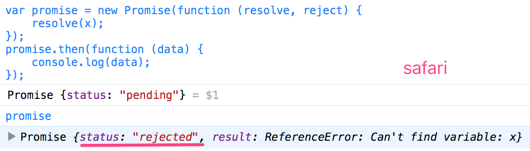
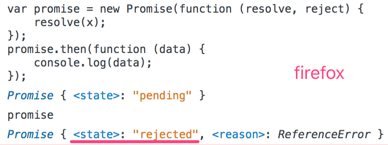
chrome不报错
safari报错
safari报错
只有Chrome会抛错,且promise状态变为rejected,Firefox和Safari中错误不会被捕获,也不会传递到外层代码,最后没有任何输出,promise状态也变为rejected。

.all()

语法:Promise.all(iterable)

该方法用于将多个Promise实例,包装成一个新的Promise实例。

var p = Promise.all([p1, p2, p3]);

Promise.all方法接受一个数组(或具有Iterator接口)作参数,数组中的对象(p1、p2、p3)均为promise实例(如果不是一个promise,该项会被用Promise.resolve转换为一个promise)。它的状态由这三个promise实例决定。

  • 当p1, p2, p3状态都变为fulfilled,p的状态才会变为fulfilled,并将三个promise返回的结果,按参数的顺序(而不是 resolved的顺序)存入数组,传给p的回调函数,如例3.8。
  • 当p1, p2, p3其中之一状态变为rejected,p的状态也会变为rejected,并把第一个被reject的promise的返回值,传给p的回调函数,如例3.9。
1
2
3
4
5
6
7
8
9
10
11
12
13
14
15
16
17
18
/* 例3.8 */
var p1 = new Promise(function (resolve, reject) {
setTimeout(resolve, 3000, "first");
});
var p2 = new Promise(function (resolve, reject) {
resolve('second');
});
var p3 = new Promise((resolve, reject) => {
setTimeout(resolve, 1000, "third");
});

Promise.all([p1, p2, p3]).then(function(values) {
console.log(values);
});

-------output-------
//约 3s 后
["first", "second", "third"]
1
2
3
4
5
6
7
8
9
10
11
12
13
14
15
16
17
18
19
/* 例3.9 */
var p1 = new Promise((resolve, reject) => {
setTimeout(resolve, 1000, "one");
});
var p2 = new Promise((resolve, reject) => {
setTimeout(reject, 2000, "two");
});
var p3 = new Promise((resolve, reject) => {
reject("three");
});

Promise.all([p1, p2, p3]).then(function (value) {
console.log('resolve', value);
}, function (error) {
console.log('reject', error); // => reject three
});

-------output-------
reject three

这多个 promise 是同时开始、并行执行的,而不是顺序执行。从下面例子可以看出。如果一个个执行,那至少需要 1+32+64+128

1
2
3
4
5
6
7
8
9
10
11
12
13
14
15
16
17
18
19
20
21
22
/* 例3.10 */
function timerPromisefy(delay) {
return new Promise(function (resolve) {
setTimeout(function () {
resolve(delay);
}, delay);
});
}
var startDate = Date.now();

Promise.all([
timerPromisefy(1),
timerPromisefy(32),
timerPromisefy(64),
timerPromisefy(128)
]).then(function (values) {
console.log(Date.now() - startDate + 'ms');
console.log(values);
});
-------output-------
133ms //不一定,但大于128ms
[1,32,64,128]

.race()

语法:Promise.race(iterable)

该方法同样是将多个Promise实例,包装成一个新的Promise实例。

var p = Promise.race([p1, p2, p3]);

Promise.race方法同样接受一个数组(或具有Iterator接口)作参数。当p1, p2, p3中有一个实例的状态发生改变(变为fulfilled或rejected),p的状态就跟着改变。并把第一个改变状态的promise的返回值,传给p的回调函数。

1
2
3
4
5
6
7
8
9
10
11
12
13
14
15
16
17
18
19
20
21
22
23
24
25
26
27
28
29
30
31
32
/* 例3.11 */
var p1 = new Promise(function(resolve, reject) {
setTimeout(reject, 500, "one");
});
var p2 = new Promise(function(resolve, reject) {
setTimeout(resolve, 100, "two");
});

Promise.race([p1, p2]).then(function(value) {
console.log('resolve', value);
}, function(error) {
//not called
console.log('reject', error);
});
-------output-------
resolve two

var p3 = new Promise(function(resolve, reject) {
setTimeout(resolve, 500, "three");
});
var p4 = new Promise(function(resolve, reject) {
setTimeout(reject, 100, "four");
});

Promise.race([p3, p4]).then(function(value) {
//not called
console.log('resolve', value);
}, function(error) {
console.log('reject', error);
});
-------output-------
reject four

在第一个promise对象变为resolve后,并不会取消其他promise对象的执行,如下例

1
2
3
4
5
6
7
8
9
10
11
12
13
14
15
16
17
18
19
20
21
/* 例3.12 */
var fastPromise = new Promise(function (resolve) {
setTimeout(function () {
console.log('fastPromise');
resolve('resolve fastPromise');
}, 100);
});
var slowPromise = new Promise(function (resolve) {
setTimeout(function () {
console.log('slowPromise');
resolve('resolve slowPromise');
}, 1000);
});
// 第一个promise变为resolve后程序停止
Promise.race([fastPromise, slowPromise]).then(function (value) {
console.log(value); // => resolve fastPromise
});
-------output-------
fastPromise
resolve fastPromise
slowPromise //仍会执行

.resolve()

语法:

1
2
3
Promise.resolve(value);
Promise.resolve(promise);
Promise.resolve(thenable);

它可以看做new Promise()的快捷方式。

1
2
3
4
5
6
Promise.resolve('Success');

/*******等同于*******/
new Promise(function (resolve) {
resolve('Success');
});

这段代码会让这个Promise对象立即进入resolved状态,并将结果success传递给then指定的onFulfilled回调函数。由于Promise.resolve()也是返回Promise对象,因此可以用.then()处理其返回值。

1
2
3
4
5
6
/* 例3.13 */
Promise.resolve('success').then(function (value) {
console.log(value);
});
-------output-------
Success
1
2
3
4
5
6
7
8
9
10
11
12
/* 例3.14 */
//Resolving an array
Promise.resolve([1,2,3]).then(function(value) {
console.log(value[0]); // => 1
});

//Resolving a Promise
var p1 = Promise.resolve('this is p1');
var p2 = Promise.resolve(p1);
p2.then(function (value) {
console.log(value); // => this is p1
});

Promise.resolve()的另一个作用就是将thenable对象(即带有then方法的对象)转换为promise对象。

1
2
3
4
5
6
7
8
9
10
11
12
13
/* 例3.15 */
var p1 = Promise.resolve({
then: function (resolve, reject) {
resolve("this is an thenable object!");
}
});
console.log(p1 instanceof Promise); // => true

p1.then(function(value) {
console.log(value); // => this is an thenable object!
}, function(e) {
//not called
});

再看下面两个例子,无论是在什么时候抛异常,只要promise状态变成resolved或rejected,状态不会再改变,这和新建promise是一样的。

1
2
3
4
5
6
7
8
9
10
11
12
13
14
15
16
17
18
19
20
21
22
23
24
25
26
27
28
29
30
/* 例3.16 */
//在回调函数前抛异常
var p1 = {
then: function(resolve) {
throw new Error("error");
resolve("Resolved");
}
};

var p2 = Promise.resolve(p1);
p2.then(function(value) {
//not called
}, function(error) {
console.log(error); // => Error: error
});

//在回调函数后抛异常
var p3 = {
then: function(resolve) {
resolve("Resolved");
throw new Error("error");
}
};

var p4 = Promise.resolve(p3);
p4.then(function(value) {
console.log(value); // => Resolved
}, function(error) {
//not called
});

.reject()

语法:Promise.reject(reason)

这个方法和上述的Promise.resolve()类似,它也是new Promise()的快捷方式。

1
2
3
4
5
6
Promise.reject(new Error('error'));

/*******等同于*******/
new Promise(function (resolve, reject) {
reject(new Error('error'));
});

这段代码会让这个Promise对象立即进入rejected状态,并将错误对象传递给then指定的onRejected回调函数。

Promise常见问题

经过上一章的学习,相信大家已经学会使用Promise。
总结一下创建promise的流程:

  1. 使用new Promise(fn)或者它的快捷方式Promise.resolve()、Promise.reject(),返回一个promise对象
  2. 在fn中指定异步的处理
    处理结果正常,调用resolve
    处理结果错误,调用reject

如果使用ES6的箭头函数,将会使写法更加简单清晰。

这一章节,将会用例子的形式,以说明promise使用过程中的注意点及容易犯的错误。

情景1:reject 和 catch 的区别

  • promise.then(onFulfilled, onRejected)
    在onFulfilled中发生异常的话,在onRejected中是捕获不到这个异常的。
  • promise.then(onFulfilled).catch(onRejected)
    .then中产生的异常能在.catch中捕获

一般情况,还是建议使用第二种,因为能捕获之前的所有异常。当然了,第二种的.catch()也可以使用.then()表示,它们本质上是没有区别的,.catch === .then(null, onRejected)

情景2:如果在then中抛错,而没有对错误进行处理(即catch),那么会一直保持reject状态,直到catch了错误

1
2
3
4
5
6
7
8
9
10
11
12
13
14
15
16
17
18
19
20
21
22
23
24
/* 例4.1 */
function taskA() {
console.log(x);
console.log("Task A");
}
function taskB() {
console.log("Task B");
}
function onRejected(error) {
console.log("Catch Error: A or B", error);
}
function finalTask() {
console.log("Final Task");
}
var promise = Promise.resolve();
promise
.then(taskA)
.then(taskB)
.catch(onRejected)
.then(finalTask);

-------output-------
Catch Error: A or B,ReferenceError: x is not defined
Final Task
1
2
3
4
5
6
7
8
9
10
11
12
13
14
15
16
17
18
19
20
21
22
23
24
25
26
27
28
29
/* 例4.2 */
function taskA() {
console.log(x);
console.log("Task A");
}
function taskB() {
console.log("Task B");
}
function onRejectedA(error) {
console.log("Catch Error: A", error);
}
function onRejectedB(error) {
console.log("Catch Error: B", error);
}
function finalTask() {
console.log("Final Task");
}
var promise = Promise.resolve();
promise
.then(taskA)
.catch(onRejectedA)
.then(taskB)
.catch(onRejectedB)
.then(finalTask);

-------output-------
Catch Error: A ReferenceError: x is not defined
Task B
Final Task

将例4.2与4.1对比,在taskA后多了对A的处理,因此,A抛错时,会按照A会按照 taskA → onRejectedA → taskB → finalTask这个流程来处理,此时taskB是正常执行的。

情景3:每次调用then都会返回一个新创建的promise对象,而then内部只是返回的数据

1
2
3
4
5
6
7
8
9
10
11
12
13
14
15
16
17
18
19
20
21
22
23
24
25
26
27
28
29
30
/* 例4.3 */
//方法1:对同一个promise对象同时调用 then 方法
var p1 = new Promise(function (resolve) {
resolve(100);
});
p1.then(function (value) {
return value * 2;
});
p1.then(function (value) {
return value * 2;
});
p1.then(function (value) {
console.log("finally: " + value);
});
-------output-------
finally: 100

//方法2:对 then 进行 promise chain 方式进行调用
var p2 = new Promise(function (resolve) {
resolve(100);
});
p2.then(function (value) {
return value * 2;
}).then(function (value) {
return value * 2;
}).then(function (value) {
console.log("finally: " + value);
});
-------output-------
finally: 400

第一种方法中,then的调用几乎是同时开始执行的,且传给每个then的value都是100,这种方法应当避免。方法二才是正确的链式调用。
因此容易出现下面的错误写法:

1
2
3
4
5
6
7
8
9
10
11
12
13
14
/* 例4.4 */
function badAsyncCall(data) {
var promise = Promise.resolve(data);
promise.then(function(value) {
//do something
return value + 1;
});
return promise;
}
badAsyncCall(10).then(function(value) {
console.log(value); //想要得到11,实际输出10
});
-------output-------
10

正确的写法应该是:

1
2
3
4
5
6
7
8
9
10
11
12
13
/* 改写例4.4 */
function goodAsyncCall(data) {
var promise = Promise.resolve(data);
return promise.then(function(value) {
//do something
return value + 1;
});
}
goodAsyncCall(10).then(function(value) {
console.log(value);
});
-------output-------
11

情景4:在异步回调中抛错,不会被catch到

1
2
3
4
5
6
7
8
9
10
// Errors thrown inside asynchronous functions will act like uncaught errors
var promise = new Promise(function(resolve, reject) {
setTimeout(function() {
throw 'Uncaught Exception!';
}, 1000);
});

promise.catch(function(e) {
console.log(e); //This is never called
});

情景5: promise状态变为resove或reject,就凝固了,不会再改变

1
2
3
4
5
6
7
8
9
10
11
12
13
14
15
16
17
console.log(1);
new Promise(function (resolve, reject){
reject();
setTimeout(function (){
resolve(); //not called
}, 0);
}).then(function(){
console.log(2);
}, function(){
console.log(3);
});
console.log(4);

-------output-------
1
4
3

结语

通过阅读这篇文章,让我对promise有个大概的认识。文章出处:https://segmentfault.com/a/1190000007032448#articleHeader16

虚拟dom的样子

1、原生dom

1
2
3
<div class="outer" id="app">
<div class="inner">内部</div>
</div>

2、虚拟dom

1
2
3
4
5
6
7
8
9
10
11
12
13
14
vnode = {
tag: 'div',
data: {
class: 'outer',
id: 'app'
},
children: [{
tag: 'div',
data: {
class: 'inner'
},
children: '内部'
}]
}

什么是虚拟dom

为了避免过多操作原生dom,用js模拟dom树结构的一个对象。

js操作原生dom为什么开销大

因为浏览器渲染dom树的引擎和 js引擎是分开的,如果通过js操作dom这些跨引擎的通讯增加了成本,以及 dom 操作引起的浏览器的回流和重绘,使得性能开销巨大,原本在 pc 端是没有性能问题的,因为 pc 的计算能力强,但是随着移动端的发展,越来越多的网页在智能手机上运行,而手机的性能参差不齐,会有性能问题。

  • 随便新建一个div,它的属性就有如下这么多:

    1
    "align, title, lang, translate, dir, hidden, accessKey, draggable, spellcheck, autocapitalize, contentEditable, isContentEditable, inputMode, offsetParent, offsetTop, offsetLeft, offsetWidth, offsetHeight, style, innerText, outerText, oncopy, oncut, onpaste, onabort, onblur, oncancel, oncanplay, oncanplaythrough, onchange, onclick, onclose, oncontextmenu, oncuechange, ondblclick, ondrag, ondragend, ondragenter, ondragleave, ondragover, ondragstart, ondrop, ondurationchange, onemptied, onended, onerror, onfocus, oninput, oninvalid, onkeydown, onkeypress, onkeyup, onload, onloadeddata, onloadedmetadata, onloadstart, onmousedown, onmouseenter, onmouseleave, onmousemove, onmouseout, onmouseover, onmouseup, onmousewheel, onpause, onplay, onplaying, onprogress, onratechange, onreset, onresize, onscroll, onseeked, onseeking, onselect, onstalled, onsubmit, onsuspend, ontimeupdate, ontoggle, onvolumechange, onwaiting, onwheel, onauxclick, ongotpointercapture, onlostpointercapture, onpointerdown, onpointermove, onpointerup, onpointercancel, onpointerover, onpointerout, onpointerenter, onpointerleave, onselectstart, onselectionchange, dataset, nonce, tabIndex, click, focus, blur, enterKeyHint, onformdata, onpointerrawupdate, attachInternals, namespaceURI, prefix, localName, tagName, id, className, classList, slot, part, attributes, shadowRoot, assignedSlot, innerHTML, outerHTML, scrollTop, scrollLeft, scrollWidth, scrollHeight, clientTop, clientLeft, clientWidth, clientHeight, attributeStyleMap, onbeforecopy, onbeforecut, onbeforepaste, onsearch, previousElementSibling, nextElementSibling, children, firstElementChild, lastElementChild, childElementCount, onfullscreenchange, onfullscreenerror, onwebkitfullscreenchange, onwebkitfullscreenerror, setPointerCapture, releasePointerCapture, hasPointerCapture, hasAttributes, getAttributeNames, getAttribute, getAttributeNS, setAttribute, setAttributeNS, removeAttribute, removeAttributeNS, hasAttribute, hasAttributeNS, toggleAttribute, getAttributeNode, getAttributeNodeNS, setAttributeNode, setAttributeNodeNS, removeAttributeNode, closest, matches, webkitMatchesSelector, attachShadow, getElementsByTagName, getElementsByTagNameNS, getElementsByClassName, insertAdjacentElement, insertAdjacentText, insertAdjacentHTML, requestPointerLock, getClientRects, getBoundingClientRect, scrollIntoView, scroll, scrollTo, scrollBy, scrollIntoViewIfNeeded, animate, computedStyleMap, before, after, replaceWith, remove, prepend, append, querySelector, querySelectorAll, requestFullscreen, webkitRequestFullScreen, webkitRequestFullscreen, createShadowRoot, getDestinationInsertionPoints, elementTiming, ELEMENT_NODE, ATTRIBUTE_NODE, TEXT_NODE, CDATA_SECTION_NODE, ENTITY_REFERENCE_NODE, ENTITY_NODE, PROCESSING_INSTRUCTION_NODE, COMMENT_NODE, DOCUMENT_NODE, DOCUMENT_TYPE_NODE, DOCUMENT_FRAGMENT_NODE, NOTATION_NODE, DOCUMENT_POSITION_DISCONNECTED, DOCUMENT_POSITION_PRECEDING, DOCUMENT_POSITION_FOLLOWING, DOCUMENT_POSITION_CONTAINS, DOCUMENT_POSITION_CONTAINED_BY, DOCUMENT_POSITION_IMPLEMENTATION_SPECIFIC, nodeType, nodeName, baseURI, isConnected, ownerDocument, parentNode, parentElement, childNodes, firstChild, lastChild, previousSibling, nextSibling, nodeValue, textContent, hasChildNodes, getRootNode, normalize, cloneNode, isEqualNode, isSameNode, compareDocumentPosition, contains, lookupPrefix, lookupNamespaceURI, isDefaultNamespace, insertBefore, appendChild, replaceChild, removeChild, addEventListener, removeEventListener, dispatchEvent, "
  • 重绘和回流(重排)

    webkit渲染过程

如果重排就会改变上面那么多属性的值

虚拟dom的新建

新建标签节点的虚拟dom

1
2
3
4
5
6
7
8
9
10
11
12
13
14
15
16
17
18
19
20
21
22
23
24
25
26
27
28
29
30
31
32
createVnodeElement(tag, data, children = null) {
let flag;
if (typeof tag === 'string') {
flag = 'html'
} else if (typeof tag === 'function') {
flag = 'component'
} else {
flag = 'text'
}
let childrenFlag;
if(children === null) {
childrenFlag = 'empty'
} else if (Array.isArray(children)) {
let length = children.length;
if (length === 0) {
childrenFlag = 'empty'
} else {
childrenFlag = 'multiple'
}
} else {
childrenFlag = 'single';
children = createTextVnode(children + '');
}

return {
flag,
tag,
data,
children,
childrenFlag
}
}

新建文本节点的虚拟dom

1
2
3
4
5
6
7
8
9
10
// 新建文本类型虚拟dom
function createTextVnode(text) {
return {
flag: vnodeType.TEXT,
tag: null,
data: null,
children: text,
childrenFlag: childType.EMPTY
}
}

虚拟dom的调用

1
2
3
4
5
6
7
vnode = createElement('div', {id: 'test'}, [
createElement(123)
createElement('p', {key: 'a', style: {color: 'blue'}}, '节点1'),
createElement('p', {key: 'b', '@click': () => {alert(xx)}}, '节点2'),
createElement('p', {key: 'c', 'class': 'item-header'}, '节点3'),
createElement('p', {key: 'd'}, '节点4')
])

虚拟dom的渲染

1
render(vnode, document.getElementById('app'))
1
2
3
4
5
6
7
8
9
10
11
12
13
14
15
16
17
18
19
20
21
// 渲染
function render(vnode, container) {
if (container.vnode) {
patch(container.vnode, vnode, container)
} else {
mount(vnode, container)
}
container.vnode = vnode;
}

// 首次挂载元素
function mount(vnode, container) {
let {flag} = vnode
// 标签节点
if (flag === 'html') {
mountElement(vnode, container)
// 文本节点
} else if (flag === 'text') {
mountText(vnode, container)
}
}

标签节点的属性挂载

1
2
3
4
5
6
if (data) {
for (let key in data) {
// 节点,名字,老值,新值
patchData(dom, key, null, data[key])
}
}

标签节点的子元素挂载

1
2
3
4
5
6
7
8
9
if (childrenFlag !== childType.EMPTY) {
if (childrenFlag === childType.SINGLE) {
mount(children, dom)
} else if (childrenFlag === childType.MULTIPLE) {
for (let i = 0; i < children.length; i++) {
mount(children[i], dom)
}
}
}

虚拟dom核心:diff

这是另一位同学分享的虚拟dom的diff算法浅析

  • 节点分标签节点和文本节点,所以需要flag来判断
  • childrenFlag判断不同的子元素
  • 判断后进行不同形式的渲染
  • 难点:diff两个数组,例子:[axxbxxc] -> [cxxaxxb] ,虚拟dom从axxbxxc变为cxxaxxb,c一开始不需要移动位置,只管插入dom中,ab俩是按字母顺序所以b就不需要移动位置,但a到c后面了不是按字母顺序,所以需要移动位置。
  • [abcd] -> [acd],react或vue的key对应list数组里每个元素,如果删掉一个b,还用index下标作为key的话,c会取代原来b的位置,这时候如果是选中c,效果就会变成d被选中,所以尽量不要用index作为key。

简易虚拟dom源码

缘由

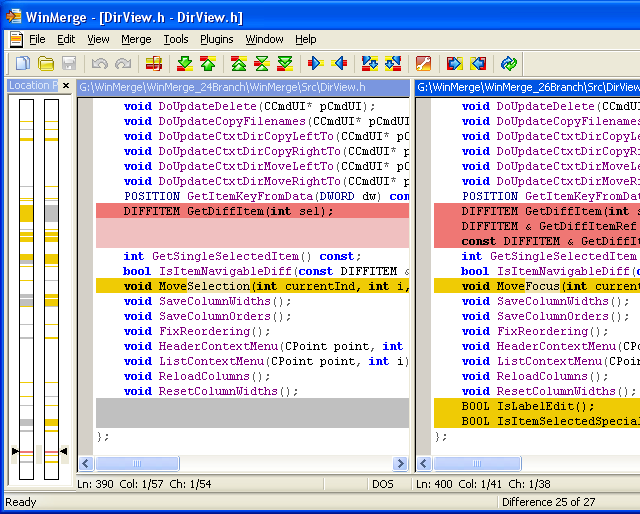
在git项目下对比修改过的文件我们一般用git diff来操作,如果改动不大可以在git bash左侧看到由加减号列出增减的改动内容,但如果改动的内容太多,在git bash上显示众多的改动内容会是一个令人头疼的问题,因为git bash显示的对比过于简单、不直观,因此我们需要外部的工具来帮我们完成直观的对比。

配置

git也意识到了这一点,所以我们可以通过.gitconfig文件来配置我们需要的外部对比工具(比如winMerge)。
文件(一般直接在C盘user里你的名字文件夹下)可以配置如下:

1
2
3
4
5
6
7
8
9
10
11
12
13
14
15
16
17
18
19
20
[mergetool]
prompt = false
keepBackup = false
keepTemporaries = false

[merge]
tool = winmerge

[mergetool "winmerge"]
name = WinMerge
trustExitCode = true
cmd = "/c/Program\\ Files\\ \\(x86\\)/WinMerge/WinMergeU.exe" -u -e -dl \"Local\" -dr \"Remote\" $LOCAL $REMOTE $MERGED

[diff]
tool = winmerge

[difftool "winmerge"]
name = WinMerge
trustExitCode = true
cmd = "/c/Program\\ Files\\ \\(x86\\)/WinMerge/WinMergeU.exe" -u -e $LOCAL $REMOTE

里面的具体参数请参看git官方说明

调用

当你再次遇上需要对比或合并时,就可以运行git difftool <file>git mergetool <file> 来自动打开对比工具进行直观的对比。
– just enjoy it–
图片